Connect your Etsy shop through your own Etsy seller app so Daoco can read your listings, orders, and reviews, and improve listings with your approval.
Etsy is a Dev Testing integration while it is being tested. Your shop connects through an Etsy seller app that you create for your own shop. Etsy’s sign-in screen names your app, not Daoco. Daoco stores your app’s keystring and shared secret encrypted for this brand, sends them only to Etsy, and calls Etsy’s Open API directly.A workspace owner or admin must first turn on Dev Testing integrations in Settings → Preview features. Etsy then appears under Dev Testing in Connections → Integrations → Add integration. Connect one shop per brand. To use the same shop with another brand, connect it there too, with the same app or a new one.
What Daoco can do
Read your shop: name, announcement, sale message, sales count, favorers, and review average.
Read your listings in any state (active, draft, inactive, sold out, expired) with views, favorers, tags, sections, and photos.
Read your orders: dates, status, totals, sales tax and VAT, items, and destination country. Revenue Daoco reports is what buyers kept paying after refunds, less the sales tax and VAT Etsy collects. Etsy does not say how much tax a partial refund returned, so revenue on a partly refunded order is an estimate.
Read your reviews, and any shop’s public reviews and active listings, and search all of Etsy for market and competitor research.
Edit a listing’s title, description, tags, materials, or section, and add a photo with alt text. A new photo goes after the listing’s other photos unless you ask for a position, such as the main photo.
Edits to a draft, inactive, or expired listing are ordinary changes. Edits to a live listing (active or sold out) and new photos change what shoppers see, so Daoco treats them like publishing. Your approval preferences decide whether you are asked first.
Limits
Daoco does not activate, renew, deactivate, or delete listings, or change prices or stock. Etsy charges a listing fee to activate or renew a listing, so do those in Etsy.
Daoco does not message buyers.
Order reads leave out buyer names, addresses, emails, and messages.
Etsy limits a title to 140 characters and a listing to 13 tags of at most 20 characters each. Tags hold only letters, numbers, spaces, -, and '. Daoco checks these before it sends a change, and a tag change replaces the whole set.
Each Etsy app has its own request limit. Daoco reads at most 100 listings, orders, or reviews per request, so a very large shop takes several requests.
A seller app reaches only the shop of the Etsy account that created it. Each shop owner creates their own app.
Before you start
Sign in to Etsy with the account that owns the shop. Daoco connects the shop of the account you sign in with.
In Daoco, select the brand that should use this shop. Only a brand’s owner or a workspace admin can save Etsy’s keys.
Allow pop-ups for Daoco. Etsy’s sign-in opens in a new window.
Connect your Etsy seller account
1
Enable Dev Testing
A workspace owner or admin turns on Dev Testing integrations in Settings → Preview features.
2
Open the Etsy card in Daoco
In Daoco, open Connections, choose the Integrations tab, choose Add integration, and pick Etsy under Dev Testing. Keep this card open; you need its OAuth redirect URI in step 4.
3
Create a seller app in Etsy
Open etsy.com/developers/register-seller-app while signed in as the shop owner.Create a seller app, not a personal app. A seller app reaches only your own shop, and Etsy approves eligible sellers within minutes. The personal app form (etsy.com/developers/register) sends your app to Etsy for a longer review and is the wrong form for this connection.
Etsy field
What to enter
App name
Anything you will recognize, such as Daoco for <your shop>.
Describe your application (500 characters at most)
Connects my own Etsy shop to Daoco, the marketing tool I use. It reads my shop, listings, views, favorites, orders, and reviews to plan marketing, and updates listing titles, descriptions, tags, materials, sections, and photos only after I approve each change. It never messages buyers, changes prices or stock, activates or renews listings, or stores buyer names, addresses, or emails. Used only for my shop. Scopes: shops_r, listings_r, listings_w, transactions_r.
Fill in anything else the form asks about your shop, accept Etsy’s API terms, and create the app. Manage your apps at etsy.com/developers shows when Etsy has approved it. The key does not work before then.
4
Add Daoco's redirect URI to the app
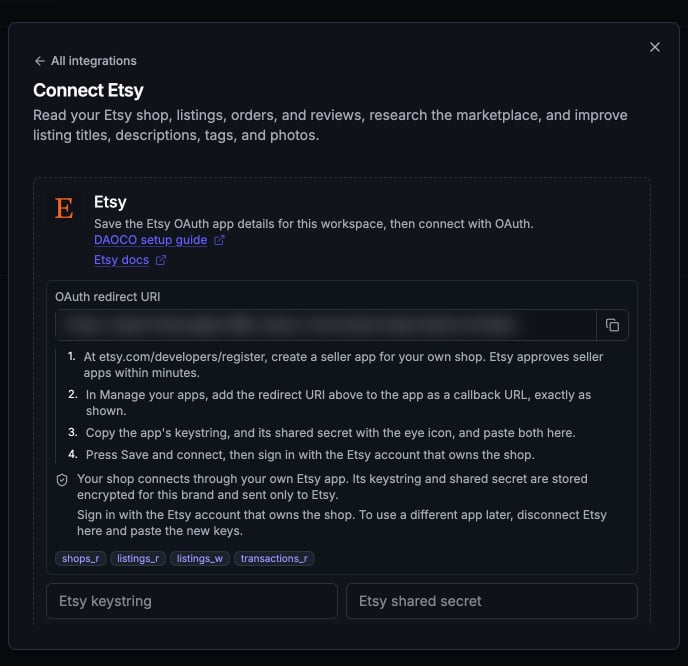
On the Daoco Etsy card, copy the OAuth redirect URI with the button at the end of the field.In Etsy, open Manage your apps, open your app, and add that address as a callback URL. Paste it exactly: Etsy matches it character for character, so a missing https:// or an extra / at the end makes sign-in fail.
Copy the OAuth redirect URI with the button at the end of the field. Yours shows your own Daoco address.
5
Copy the keystring and shared secret
In Manage your apps, find your app. Copy the keystring, then click the eye icon next to shared secret to reveal it and copy it.Treat the shared secret like a password. Paste it only into the Daoco Etsy card, never into a chat, a ticket, or an email.
6
Save and connect
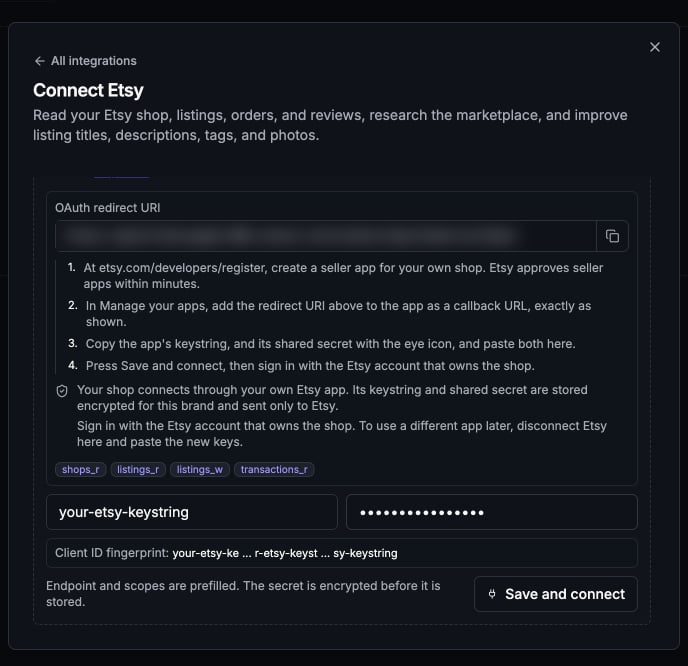
On the Etsy card, paste the keystring into Etsy keystring and the shared secret into Etsy shared secret, then choose Save and connect.
Paste the keystring on the left and the shared secret on the right, then choose Save and connect.
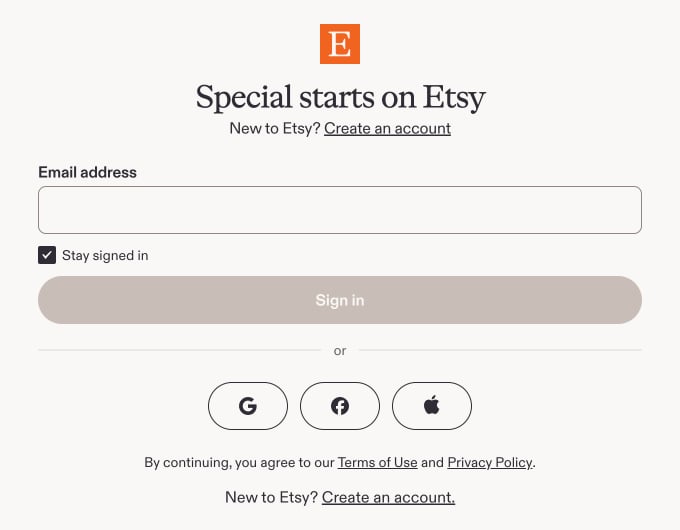
Etsy opens in a new window. Sign in as the shop owner if Etsy asks, check that the shop is yours, and allow access. You return to Daoco, and the card shows Etsy: <your shop name>.
If you are not signed in to Etsy, it asks you to sign in first.
If no window opens, allow pop-ups for Daoco, paste the shared secret again, and choose Save and connect. Until Etsy is connected, the card keeps asking for the keys, and saving replaces the ones saved before.
7
Verify from chat
Ask Daoco for your five most-viewed active Etsy listings. It answers from your shop with each listing’s views and favorers.
Try it
Which of my Etsy listings get views but no orders, and why?
Rewrite the tags on my top 5 Etsy listings for search. Show me before you change anything.
Search Etsy for "moon phase print" and compare the top shops' prices and titles with mine.
/store-review for a ranked review of what sells and who buys.
Disconnect
Disconnect Etsy from its card in Connections. Daoco deletes the connection and the saved keystring and shared secret, which ends Daoco’s access. Your seller app stays in Etsy under Manage your apps; delete it there to end its access everywhere.To use different keys, for example after you regenerate the shared secret in Etsy, disconnect Etsy in Daoco, then paste the new keystring and shared secret and connect again.
Troubleshooting
Etsy says the redirect URI or callback URL is invalid
The callback URL on your Etsy app must match the OAuth redirect URI on the Daoco card exactly, including https:// and with no trailing /. Copy it again with the copy button, save it on the app, and choose Save and connect again.
I landed on a form that says Etsy will review my description
You signed in to Etsy with an account that doesn’t own a shop. Sign out of Etsy, sign in as the shop owner, and connect again.
Etsy refused the request (403), or the key is not active
Etsy may not have approved the app yet. Check its status under Manage your apps. If it is approved, the keystring or shared secret may be wrong or regenerated. If this happened while connecting, the Etsy card asks for the keys again: paste the current values and choose Save and connect. If Etsy was already connected, disconnect Etsy in Daoco first, then paste the current values and connect again.
Etsy's rate limit was reached
Each Etsy app has its own request limit. Wait a minute and ask again.
{"docsConfig":{"theme":"willow","$schema":"https://mintlify.com/docs.json","name":"Daoco docs","description":"User-facing documentation for using Daoco.","colors":{"primary":"#6A5CFE","light":"#8377FE","dark":"#2F74F7"},"logo":{"light":"https://mintcdn.com/daoco/8TTgP6Lukje-yA18/images/logo-wordmark.svg?fit=max\u0026auto=format\u0026n=8TTgP6Lukje-yA18\u0026q=85\u0026s=c9089d3524b37d9c4f1b6069b788cc44","dark":"https://mintcdn.com/daoco/8TTgP6Lukje-yA18/images/logo-wordmark.svg?fit=max\u0026auto=format\u0026n=8TTgP6Lukje-yA18\u0026q=85\u0026s=c9089d3524b37d9c4f1b6069b788cc44"},"favicon":"https://mintcdn.com/daoco/8TTgP6Lukje-yA18/images/favicon.svg?fit=max\u0026auto=format\u0026n=8TTgP6Lukje-yA18\u0026q=85\u0026s=66ac4ceed9699adbe51a1365414a8cdb","fonts":{"heading":{"family":"Inter","weight":700},"body":{"family":"Inter","weight":400}},"integrations":{"posthog":{"apiKey":"phc_FqLYdYlXebFNNnjhIkmil2P620frh4YQr6Yq4nm2Mz9","apiHost":"https://us.i.posthog.com"}},"styling":{"latex":true},"navigation":{"pages":[]}},"deployment":{"deploymentMetadataValue":{"subdomain":"daoco","hasAudioNarration":false,"actualSubdomain":"daoco","customDomains":["docs.daoco.org"],"gitSource":{"type":"github","owner":"daocodotorg","repo":"daoco","deployBranch":"master","contentDirectory":"docs/product-docs","isPrivate":true,"mountPath":"","label":""},"entitlements":{},"buildId":"6af2264574471b0cd9b96b59","clientVersion":"0.0.4177","searchFilterCounts":[{"language":"default","tag":"Connections","count":67},{"language":"default","tag":"Core workflows","count":26},{"language":"default","tag":"Integrations: Mail \u0026 Calendar","count":12},{"language":"default","tag":"Specialists","count":12},{"language":"default","tag":"Integrations: Work \u0026 Knowledge","count":11},{"language":"default","tag":"Social accounts","count":10},{"language":"default","tag":"Create and publish","count":9},{"language":"default","tag":"Account and billing","count":8},{"language":"default","tag":"Workspace admin","count":8},{"language":"default","tag":"Integrations: Commerce \u0026 Website","count":8}]},"assistantConfig":{"enableAskAiButton":false,"enableStarterQuestions":false,"enableContextualStarterQuestions":false,"enableAskAiSearchBar":true},"basePath":"","hasChatPermissions":false,"hasWebMcpPermissions":false,"toggles":[{"name":"kill-isr","enabled":true,"variant":{"name":"disabled","enabled":false,"feature_enabled":true},"impressionData":false},{"name":"custom-rbac-roles","enabled":true,"variant":{"name":"disabled","enabled":false,"feature_enabled":true},"impressionData":false},{"name":"agent-mintlify-slack","enabled":true,"variant":{"name":"disabled","enabled":false,"feature_enabled":true},"impressionData":false},{"name":"agent-integrations-settings","enabled":true,"variant":{"name":"disabled","enabled":false,"feature_enabled":true},"impressionData":false},{"name":"rbac-expansion","enabled":true,"variant":{"name":"disabled","enabled":false,"feature_enabled":true},"impressionData":false},{"name":"automations-pr-grouping","enabled":true,"variant":{"name":"disabled","enabled":false,"feature_enabled":true},"impressionData":false},{"name":"custom-prefix","enabled":true,"variant":{"name":"disabled","enabled":false,"feature_enabled":true},"impressionData":false},{"name":"analytics-v7","enabled":true,"variant":{"name":"disabled","enabled":false,"feature_enabled":true},"impressionData":false},{"name":"user-flows-analytics","enabled":true,"variant":{"name":"disabled","enabled":false,"feature_enabled":true},"impressionData":false},{"name":"no-publish-flow","enabled":true,"variant":{"name":"disabled","enabled":false,"feature_enabled":true},"impressionData":false},{"name":"workos-onboarding","enabled":true,"variant":{"name":"disabled","enabled":false,"feature_enabled":true},"impressionData":false},{"name":"snapshot-serving-live","enabled":true,"variant":{"name":"disabled","enabled":false,"feature_enabled":true},"impressionData":false},{"name":"stripTemperatureMiddleware","enabled":true,"variant":{"name":"disabled","enabled":false,"feature_enabled":true},"impressionData":false},{"name":"support-platform-pylon-zendesk","enabled":true,"variant":{"name":"disabled","enabled":false,"feature_enabled":true},"impressionData":false},{"name":"snapshot-serving","enabled":true,"variant":{"name":"disabled","enabled":false,"feature_enabled":true},"impressionData":false},{"name":"instant-rollback","enabled":true,"variant":{"name":"disabled","enabled":false,"feature_enabled":true},"impressionData":false},{"name":"granular-notifications-server","enabled":true,"variant":{"name":"disabled","enabled":false,"feature_enabled":true},"impressionData":false},{"name":"granular-notifications","enabled":true,"variant":{"name":"disabled","enabled":false,"feature_enabled":true},"impressionData":false},{"name":"automations-fable","enabled":true,"variant":{"name":"disabled","enabled":false,"feature_enabled":true},"impressionData":false},{"name":"fixed-ai-action-pricing","enabled":true,"variant":{"name":"disabled","enabled":false,"feature_enabled":true},"impressionData":false},{"name":"automation-resolve-merge-conflict","enabled":true,"variant":{"name":"disabled","enabled":false,"feature_enabled":true},"impressionData":false},{"name":"scoped-publishing","enabled":true,"variant":{"name":"disabled","enabled":false,"feature_enabled":true},"impressionData":false},{"name":"mintql","enabled":true,"variant":{"name":"disabled","enabled":false,"feature_enabled":true},"impressionData":false},{"name":"page-level-analytics","enabled":true,"variant":{"name":"disabled","enabled":false,"feature_enabled":true},"impressionData":false},{"name":"editor-version-history-v2","enabled":true,"variant":{"name":"disabled","enabled":false,"feature_enabled":true},"impressionData":false},{"name":"billing-page-v2","enabled":true,"variant":{"name":"disabled","enabled":false,"feature_enabled":true},"impressionData":false},{"name":"full-page-search","enabled":true,"variant":{"name":"disabled","enabled":false,"feature_enabled":true},"impressionData":false},{"name":"workspace-projects","enabled":true,"variant":{"name":"disabled","enabled":false,"feature_enabled":true},"impressionData":false},{"name":"assistant-v5","enabled":true,"variant":{"name":"disabled","enabled":false,"feature_enabled":true},"impressionData":false},{"name":"fork-pr-previews","enabled":true,"variant":{"name":"disabled","enabled":false,"feature_enabled":true},"impressionData":false},{"name":"revalidation-jwt","enabled":true,"variant":{"name":"disabled","enabled":false,"feature_enabled":true},"impressionData":false},{"name":"workos-sso-scim","enabled":true,"variant":{"name":"disabled","enabled":false,"feature_enabled":true},"impressionData":false},{"name":"hobby-abuse-scan","enabled":true,"variant":{"name":"disabled","enabled":false,"feature_enabled":true},"impressionData":false},{"name":"dashboard-inbox","enabled":true,"variant":{"name":"disabled","enabled":false,"feature_enabled":true},"impressionData":false},{"name":"workos-signup","enabled":true,"variant":{"name":"disabled","enabled":false,"feature_enabled":true},"impressionData":false},{"name":"turbopuffer-dual-write","enabled":true,"variant":{"name":"disabled","enabled":false,"feature_enabled":true},"impressionData":false},{"name":"workos-enabled","enabled":true,"variant":{"name":"disabled","enabled":false,"feature_enabled":true},"impressionData":false},{"name":"approve-review-flow","enabled":true,"variant":{"name":"disabled","enabled":false,"feature_enabled":true},"impressionData":false},{"name":"editor-metadata","enabled":true,"variant":{"name":"disabled","enabled":false,"feature_enabled":true},"impressionData":false},{"name":"sso-setup-deadline-banner","enabled":true,"variant":{"name":"disabled","enabled":false,"feature_enabled":true},"impressionData":false},{"name":"turbopuffer-serve","enabled":true,"variant":{"name":"disabled","enabled":false,"feature_enabled":true},"impressionData":false},{"name":"live-agents","enabled":true,"variant":{"name":"disabled","enabled":false,"feature_enabled":true},"impressionData":false},{"name":"starter-pricing","enabled":true,"variant":{"name":"control","enabled":true,"payload":{"type":"string","value":"control"},"feature_enabled":true},"impressionData":false},{"name":"llms-txt-v2","enabled":true,"variant":{"name":"disabled","enabled":false,"feature_enabled":true},"impressionData":false}],"googleFontsInlined":false},"customCss":[{"filePath":"style.css","content":"#content-container,#sidebar,#table-of-contents,#navbar,#footer{border-radius:22px;overflow:auto}card,card a,.card,.card a,card-group,.card-group,card-group a,.card-group a,card-group>div,.card-group>div,callout,.callout,code-block,.code-block,code-group,.code-group,frame,.frame,expandable,.expandable,accordion,.accordion,tabs,.tabs,img,table,pre,pre code,.pagination-prev,.pagination-next,.topbar-cta-button,button{border-radius:18px;overflow:hidden}.steps{border-radius:0;overflow:visible!important}#content-container ol{padding-left:1.625rem}#content-container ol>li{padding-left:0.25rem}#content-container ol>li::marker{font-weight:650}#navbar nav-logo img,#navbar .nav-logo img,#navbar nav-logo svg,#navbar .nav-logo svg,nav-logo img,.nav-logo img,nav-logo svg,.nav-logo svg{height:32px!important;width:auto!important}#navbar a:first-of-type img,#navbar a:first-of-type svg{height:32px!important;width:auto!important}"}],"page":{"pagePath":"connections/mcp/etsy","slug":"/connections/mcp/etsy","pageMetadata":{"title":"Connect Etsy","description":"Connect your Etsy shop through your own Etsy seller app so Daoco can read your listings, orders, and reviews, and improve listings with your approval.","href":"/connections/mcp/etsy"},"description":{"compiledSource":"\"use strict\";\nconst {jsx: _jsx} = arguments[0];\nconst {useMDXComponents: _provideComponents} = arguments[0];\nfunction _createMdxContent(props) {\n const _components = {\n p: \"p\",\n ..._provideComponents(),\n ...props.components\n };\n return _jsx(_components.p, {\n children: \"Connect your Etsy shop through your own Etsy seller app so Daoco can read your listings, orders, and reviews, and improve listings with your approval.\"\n });\n}\nfunction MDXContent(props = {}) {\n const {wrapper: MDXLayout} = {\n ..._provideComponents(),\n ...props.components\n };\n return MDXLayout ? _jsx(MDXLayout, {\n ...props,\n children: _jsx(_createMdxContent, {\n ...props\n })\n }) : _createMdxContent(props);\n}\nreturn {\n default: MDXContent\n};\n","frontmatter":{},"scope":{}},"pageType":"default","mdx":{"mdxSource":{"compiledSource":"\"use strict\";const{Fragment:_Fragment,jsx:_jsx,jsxs:_jsxs}=arguments[0];const{useMDXComponents:_provideComponents}=arguments[0];function _createMdxContent(props){const _components={a:`a`,code:`code`,li:`li`,p:`p`,strong:`strong`,tbody:`tbody`,td:`td`,th:`th`,thead:`thead`,tr:`tr`,ul:`ul`,..._provideComponents(),...props.components},{Accordion,AccordionGroup,Frame,Heading,OptimizedImage,Step,Steps,Table}=_components;if(!Accordion)_missingMdxReference(`Accordion`,true);if(!AccordionGroup)_missingMdxReference(`AccordionGroup`,true);if(!Frame)_missingMdxReference(`Frame`,true);if(!Heading)_missingMdxReference(`Heading`,true);if(!OptimizedImage)_missingMdxReference(`OptimizedImage`,true);if(!Step)_missingMdxReference(`Step`,true);if(!Steps)_missingMdxReference(`Steps`,true);if(!Table)_missingMdxReference(`Table`,true);return _jsxs(_Fragment,{children:[_jsxs(_components.p,{children:[`Etsy is a `,_jsx(_components.strong,{children:`Dev Testing`}),` integration while it is being tested. Your shop connects through an Etsy `,_jsx(_components.strong,{children:`seller app`}),` that you create for your own shop. Etsy’s sign-in screen names your app, not Daoco. Daoco stores your app’s keystring and shared secret encrypted for this brand, sends them only to Etsy, and calls Etsy’s Open API directly.`]}),`\n`,_jsxs(_components.p,{children:[`A workspace owner or admin must first turn on `,_jsx(_components.strong,{children:`Dev Testing integrations`}),` in `,_jsx(_components.strong,{children:`Settings`}),` → `,_jsx(_components.strong,{children:`Preview features`}),`. Etsy then appears under `,_jsx(_components.strong,{children:`Dev Testing`}),` in `,_jsx(_components.strong,{children:`Connections`}),` → `,_jsx(_components.strong,{children:`Integrations`}),` → `,_jsx(_components.strong,{children:`Add integration`}),`. Connect one shop per brand. To use the same shop with another brand, connect it there too, with the same app or a new one.`]}),`\n`,_jsx(Heading,{level:`2`,id:`what-daoco-can-do`,children:`What Daoco can do`}),`\n`,_jsxs(_components.ul,{children:[`\n`,_jsx(_components.li,{children:`Read your shop: name, announcement, sale message, sales count, favorers, and review average.`}),`\n`,_jsx(_components.li,{children:`Read your listings in any state (active, draft, inactive, sold out, expired) with views, favorers, tags, sections, and photos.`}),`\n`,_jsx(_components.li,{children:`Read your orders: dates, status, totals, sales tax and VAT, items, and destination country. Revenue Daoco reports is what buyers kept paying after refunds, less the sales tax and VAT Etsy collects. Etsy does not say how much tax a partial refund returned, so revenue on a partly refunded order is an estimate.`}),`\n`,_jsx(_components.li,{children:`Read your reviews, and any shop’s public reviews and active listings, and search all of Etsy for market and competitor research.`}),`\n`,_jsx(_components.li,{children:`Edit a listing’s title, description, tags, materials, or section, and add a photo with alt text. A new photo goes after the listing’s other photos unless you ask for a position, such as the main photo.`}),`\n`]}),`\n`,_jsxs(_components.p,{children:[`Edits to a draft, inactive, or expired listing are ordinary changes. Edits to a live listing (active or sold out) and new photos change what shoppers see, so Daoco treats them like publishing. Your `,_jsx(_components.a,{href:`/account-and-billing/approval-preferences`,children:`approval preferences`}),` decide whether you are asked first.`]}),`\n`,_jsx(Heading,{level:`2`,id:`limits`,children:`Limits`}),`\n`,_jsxs(_components.ul,{children:[`\n`,_jsx(_components.li,{children:`Daoco does not activate, renew, deactivate, or delete listings, or change prices or stock. Etsy charges a listing fee to activate or renew a listing, so do those in Etsy.`}),`\n`,_jsx(_components.li,{children:`Daoco does not message buyers.`}),`\n`,_jsx(_components.li,{children:`Order reads leave out buyer names, addresses, emails, and messages.`}),`\n`,_jsxs(_components.li,{children:[`Etsy limits a title to 140 characters and a listing to 13 tags of at most 20 characters each. Tags hold only letters, numbers, spaces, `,_jsx(_components.code,{children:`-`}),`, and `,_jsx(_components.code,{children:`'`}),`. Daoco checks these before it sends a change, and a tag change replaces the whole set.`]}),`\n`,_jsx(_components.li,{children:`Each Etsy app has its own request limit. Daoco reads at most 100 listings, orders, or reviews per request, so a very large shop takes several requests.`}),`\n`,_jsx(_components.li,{children:`A seller app reaches only the shop of the Etsy account that created it. Each shop owner creates their own app.`}),`\n`]}),`\n`,_jsx(Heading,{level:`2`,id:`before-you-start`,children:`Before you start`}),`\n`,_jsxs(_components.ul,{children:[`\n`,_jsxs(_components.li,{children:[`Sign in to Etsy with the account that `,_jsx(_components.strong,{children:`owns the shop`}),`. Daoco connects the shop of the account you sign in with.`]}),`\n`,_jsx(_components.li,{children:`In Daoco, select the brand that should use this shop. Only a brand’s owner or a workspace admin can save Etsy’s keys.`}),`\n`,_jsx(_components.li,{children:`Allow pop-ups for Daoco. Etsy’s sign-in opens in a new window.`}),`\n`]}),`\n`,_jsx(Heading,{level:`2`,id:`connect-your-etsy-seller-account`,children:`Connect your Etsy seller account`}),`\n`,_jsxs(Steps,{children:[_jsx(Step,{title:`Enable Dev Testing`,children:_jsxs(_components.p,{children:[`A workspace owner or admin turns on `,_jsx(_components.strong,{children:`Dev Testing integrations`}),` in `,_jsx(_components.strong,{children:`Settings`}),` → `,_jsx(_components.strong,{children:`Preview features`}),`.`]})}),_jsx(Step,{title:`Open the Etsy card in Daoco`,children:_jsxs(_components.p,{children:[`In Daoco, open `,_jsx(_components.strong,{children:`Connections`}),`, choose the `,_jsx(_components.strong,{children:`Integrations`}),` tab, choose `,_jsx(_components.strong,{children:`Add integration`}),`, and pick `,_jsx(_components.strong,{children:`Etsy`}),` under `,_jsx(_components.strong,{children:`Dev Testing`}),`. Keep this card open; you need its `,_jsx(_components.strong,{children:`OAuth redirect URI`}),` in step 4.`]})}),_jsxs(Step,{title:`Create a seller app in Etsy`,children:[_jsxs(_components.p,{children:[`Open `,_jsx(_components.a,{href:`https://www.etsy.com/developers/register-seller-app`,children:`etsy.com/developers/register-seller-app`}),` while signed in as the shop owner.`]}),_jsxs(_components.p,{children:[`Create a `,_jsx(_components.strong,{children:`seller app`}),`, not a personal app. A seller app reaches only your own shop, and Etsy approves eligible sellers within minutes. The personal app form (`,_jsx(_components.code,{children:`etsy.com/developers/register`}),`) sends your app to Etsy for a longer review and is the wrong form for this connection.`]}),_jsxs(Table,{children:[_jsx(_components.thead,{children:_jsxs(_components.tr,{children:[_jsx(_components.th,{children:`Etsy field`}),_jsx(_components.th,{children:`What to enter`})]})}),_jsxs(_components.tbody,{children:[_jsxs(_components.tr,{children:[_jsx(_components.td,{children:`App name`}),_jsxs(_components.td,{children:[`Anything you will recognize, such as `,_jsx(_components.code,{children:`Daoco for \u003cyour shop>`}),`.`]})]}),_jsxs(_components.tr,{children:[_jsx(_components.td,{children:`Describe your application (500 characters at most)`}),_jsx(_components.td,{children:_jsx(_components.code,{children:`Connects my own Etsy shop to Daoco, the marketing tool I use. It reads my shop, listings, views, favorites, orders, and reviews to plan marketing, and updates listing titles, descriptions, tags, materials, sections, and photos only after I approve each change. It never messages buyers, changes prices or stock, activates or renews listings, or stores buyer names, addresses, or emails. Used only for my shop. Scopes: shops_r, listings_r, listings_w, transactions_r.`})})]})]})]}),_jsxs(_components.p,{children:[`Fill in anything else the form asks about your shop, accept Etsy’s API terms, and create the app. `,_jsx(_components.strong,{children:`Manage your apps`}),` at `,_jsx(_components.a,{href:`https://www.etsy.com/developers`,children:`etsy.com/developers`}),` shows when Etsy has approved it. The key does not work before then.`]})]}),_jsxs(Step,{title:`Add Daoco's redirect URI to the app`,children:[_jsxs(_components.p,{children:[`On the Daoco Etsy card, copy the `,_jsx(_components.strong,{children:`OAuth redirect URI`}),` with the button at the end of the field.`]}),_jsxs(_components.p,{children:[`In Etsy, open `,_jsx(_components.strong,{children:`Manage your apps`}),`, open your app, and add that address as a `,_jsx(_components.strong,{children:`callback URL`}),`. Paste it exactly: Etsy matches it character for character, so a missing `,_jsx(_components.code,{children:`https://`}),` or an extra `,_jsx(_components.code,{children:`/`}),` at the end makes sign-in fail.`]}),_jsx(Frame,{caption:`Copy the OAuth redirect URI with the button at the end of the field. Yours shows your own Daoco address.`,children:_jsx(OptimizedImage,{src:`https://mintcdn.com/daoco/904iw-7dHBjpal67/images/connections/etsy/daoco-redirect-uri.png?fit=max\u0026auto=format\u0026n=904iw-7dHBjpal67\u0026q=85\u0026s=d5611d6e4968dc702e2108e7b42002e9`,alt:`Daoco Connect Etsy card showing the OAuth redirect URI field, its copy button, and the four setup steps`,\"data-og-width\":`688`,width:`688`,\"data-og-height\":`666`,height:`666`,\"data-path\":`images/connections/etsy/daoco-redirect-uri.png`,\"data-optimize\":`true`,\"data-opv\":`3`,srcset:`https://mintcdn.com/daoco/904iw-7dHBjpal67/images/connections/etsy/daoco-redirect-uri.png?w=280\u0026fit=max\u0026auto=format\u0026n=904iw-7dHBjpal67\u0026q=85\u0026s=37fce73ef190cb28dc8636f8e47d05cb 280w, https://mintcdn.com/daoco/904iw-7dHBjpal67/images/connections/etsy/daoco-redirect-uri.png?w=560\u0026fit=max\u0026auto=format\u0026n=904iw-7dHBjpal67\u0026q=85\u0026s=50462ecc19bde7b30d7811396bedbd47 560w, https://mintcdn.com/daoco/904iw-7dHBjpal67/images/connections/etsy/daoco-redirect-uri.png?w=840\u0026fit=max\u0026auto=format\u0026n=904iw-7dHBjpal67\u0026q=85\u0026s=8c698eceaf24aca6f20dffd104bc4e10 840w, https://mintcdn.com/daoco/904iw-7dHBjpal67/images/connections/etsy/daoco-redirect-uri.png?w=1100\u0026fit=max\u0026auto=format\u0026n=904iw-7dHBjpal67\u0026q=85\u0026s=28272108782f013d9bf7ba4aa49eb549 1100w, https://mintcdn.com/daoco/904iw-7dHBjpal67/images/connections/etsy/daoco-redirect-uri.png?w=1650\u0026fit=max\u0026auto=format\u0026n=904iw-7dHBjpal67\u0026q=85\u0026s=e147f0fdab8cf4a20f5f0a6f68c77bc9 1650w, https://mintcdn.com/daoco/904iw-7dHBjpal67/images/connections/etsy/daoco-redirect-uri.png?w=2500\u0026fit=max\u0026auto=format\u0026n=904iw-7dHBjpal67\u0026q=85\u0026s=97d62c0ca5c144e3dac6b7b1063545a0 2500w`})})]}),_jsxs(Step,{title:`Copy the keystring and shared secret`,children:[_jsxs(_components.p,{children:[`In `,_jsx(_components.strong,{children:`Manage your apps`}),`, find your app. Copy the `,_jsx(_components.strong,{children:`keystring`}),`, then click the eye icon next to `,_jsx(_components.strong,{children:`shared secret`}),` to reveal it and copy it.`]}),_jsx(_components.p,{children:`Treat the shared secret like a password. Paste it only into the Daoco Etsy card, never into a chat, a ticket, or an email.`})]}),_jsxs(Step,{title:`Save and connect`,children:[_jsxs(_components.p,{children:[`On the Etsy card, paste the keystring into `,_jsx(_components.strong,{children:`Etsy keystring`}),` and the shared secret into `,_jsx(_components.strong,{children:`Etsy shared secret`}),`, then choose `,_jsx(_components.strong,{children:`Save and connect`}),`.`]}),_jsx(Frame,{caption:`Paste the keystring on the left and the shared secret on the right, then choose Save and connect.`,children:_jsx(OptimizedImage,{src:`https://mintcdn.com/daoco/904iw-7dHBjpal67/images/connections/etsy/daoco-keys.png?fit=max\u0026auto=format\u0026n=904iw-7dHBjpal67\u0026q=85\u0026s=4b373905dfcc62cffdd78b45ac2f9d40`,alt:`Daoco Connect Etsy card with the Etsy keystring and Etsy shared secret fields filled in and the Save and connect button`,\"data-og-width\":`688`,width:`688`,\"data-og-height\":`666`,height:`666`,\"data-path\":`images/connections/etsy/daoco-keys.png`,\"data-optimize\":`true`,\"data-opv\":`3`,srcset:`https://mintcdn.com/daoco/904iw-7dHBjpal67/images/connections/etsy/daoco-keys.png?w=280\u0026fit=max\u0026auto=format\u0026n=904iw-7dHBjpal67\u0026q=85\u0026s=37452efc9bf30f32b0963eb3e441fb80 280w, https://mintcdn.com/daoco/904iw-7dHBjpal67/images/connections/etsy/daoco-keys.png?w=560\u0026fit=max\u0026auto=format\u0026n=904iw-7dHBjpal67\u0026q=85\u0026s=c97f583d911623b86db7a07013547704 560w, https://mintcdn.com/daoco/904iw-7dHBjpal67/images/connections/etsy/daoco-keys.png?w=840\u0026fit=max\u0026auto=format\u0026n=904iw-7dHBjpal67\u0026q=85\u0026s=21fd4e45c6e47b1c8b67112725c18ee3 840w, https://mintcdn.com/daoco/904iw-7dHBjpal67/images/connections/etsy/daoco-keys.png?w=1100\u0026fit=max\u0026auto=format\u0026n=904iw-7dHBjpal67\u0026q=85\u0026s=de4d6e9038a5cc005df3aafee217051c 1100w, https://mintcdn.com/daoco/904iw-7dHBjpal67/images/connections/etsy/daoco-keys.png?w=1650\u0026fit=max\u0026auto=format\u0026n=904iw-7dHBjpal67\u0026q=85\u0026s=7c13c0d24720e987c008fdbbc9f8fad0 1650w, https://mintcdn.com/daoco/904iw-7dHBjpal67/images/connections/etsy/daoco-keys.png?w=2500\u0026fit=max\u0026auto=format\u0026n=904iw-7dHBjpal67\u0026q=85\u0026s=861d9d58a42a290962571df0cc377342 2500w`})}),_jsxs(_components.p,{children:[`Etsy opens in a new window. Sign in as the shop owner if Etsy asks, check that the shop is yours, and allow access. You return to Daoco, and the card shows `,_jsxs(_components.strong,{children:[`Etsy: `,_jsx(_components.code,{children:`\u003cyour shop name>`})]}),`.`]}),_jsx(Frame,{caption:`If you are not signed in to Etsy, it asks you to sign in first.`,children:_jsx(OptimizedImage,{src:`https://mintcdn.com/daoco/904iw-7dHBjpal67/images/connections/etsy/etsy-sign-in.png?fit=max\u0026auto=format\u0026n=904iw-7dHBjpal67\u0026q=85\u0026s=337a72f1a7e55729ae85414cb9d7feb5`,alt:`Etsy sign-in page shown after choosing Save and connect`,\"data-og-width\":`680`,width:`680`,\"data-og-height\":`530`,height:`530`,\"data-path\":`images/connections/etsy/etsy-sign-in.png`,\"data-optimize\":`true`,\"data-opv\":`3`,srcset:`https://mintcdn.com/daoco/904iw-7dHBjpal67/images/connections/etsy/etsy-sign-in.png?w=280\u0026fit=max\u0026auto=format\u0026n=904iw-7dHBjpal67\u0026q=85\u0026s=5ec650082464049df5f2385f9efb0083 280w, https://mintcdn.com/daoco/904iw-7dHBjpal67/images/connections/etsy/etsy-sign-in.png?w=560\u0026fit=max\u0026auto=format\u0026n=904iw-7dHBjpal67\u0026q=85\u0026s=4992467f4052c60252e39fa7e2164a00 560w, https://mintcdn.com/daoco/904iw-7dHBjpal67/images/connections/etsy/etsy-sign-in.png?w=840\u0026fit=max\u0026auto=format\u0026n=904iw-7dHBjpal67\u0026q=85\u0026s=8241aaccea346390d579aecb137e43a5 840w, https://mintcdn.com/daoco/904iw-7dHBjpal67/images/connections/etsy/etsy-sign-in.png?w=1100\u0026fit=max\u0026auto=format\u0026n=904iw-7dHBjpal67\u0026q=85\u0026s=32ead7d1a323278ab772749838673ccd 1100w, https://mintcdn.com/daoco/904iw-7dHBjpal67/images/connections/etsy/etsy-sign-in.png?w=1650\u0026fit=max\u0026auto=format\u0026n=904iw-7dHBjpal67\u0026q=85\u0026s=aa6bc16e2229c60f9febca86a0938623 1650w, https://mintcdn.com/daoco/904iw-7dHBjpal67/images/connections/etsy/etsy-sign-in.png?w=2500\u0026fit=max\u0026auto=format\u0026n=904iw-7dHBjpal67\u0026q=85\u0026s=6c79e8f5e4d66643e52ade65bab841c7 2500w`})}),_jsxs(_components.p,{children:[`If no window opens, allow pop-ups for Daoco, paste the shared secret again, and choose `,_jsx(_components.strong,{children:`Save and connect`}),`. Until Etsy is connected, the card keeps asking for the keys, and saving replaces the ones saved before.`]})]}),_jsx(Step,{title:`Verify from chat`,children:_jsx(_components.p,{children:`Ask Daoco for your five most-viewed active Etsy listings. It answers from your shop with each listing’s views and favorers.`})})]}),`\n`,_jsx(Heading,{level:`2`,id:`try-it`,children:`Try it`}),`\n`,_jsxs(_components.ul,{children:[`\n`,_jsx(_components.li,{children:_jsx(_components.code,{children:`Which of my Etsy listings get views but no orders, and why?`})}),`\n`,_jsx(_components.li,{children:_jsx(_components.code,{children:`Rewrite the tags on my top 5 Etsy listings for search. Show me before you change anything.`})}),`\n`,_jsx(_components.li,{children:_jsx(_components.code,{children:`Search Etsy for \"moon phase print\" and compare the top shops' prices and titles with mine.`})}),`\n`,_jsxs(_components.li,{children:[_jsx(_components.code,{children:`/store-review`}),` for a ranked review of what sells and who buys.`]}),`\n`]}),`\n`,_jsx(Heading,{level:`2`,id:`disconnect`,children:`Disconnect`}),`\n`,_jsxs(_components.p,{children:[`Disconnect Etsy from its card in `,_jsx(_components.strong,{children:`Connections`}),`. Daoco deletes the connection and the saved keystring and shared secret, which ends Daoco’s access. Your seller app stays in Etsy under `,_jsx(_components.strong,{children:`Manage your apps`}),`; delete it there to end its access everywhere.`]}),`\n`,_jsx(_components.p,{children:`To use different keys, for example after you regenerate the shared secret in Etsy, disconnect Etsy in Daoco, then paste the new keystring and shared secret and connect again.`}),`\n`,_jsx(Heading,{level:`2`,id:`troubleshooting`,children:`Troubleshooting`}),`\n`,_jsxs(AccordionGroup,{children:[_jsx(Accordion,{title:`Etsy says the redirect URI or callback URL is invalid`,id:`etsy-says-the-redirect-uri-or-callback-url-is-invalid`,children:_jsxs(_components.p,{children:[`The callback URL on your Etsy app must match the `,_jsx(_components.strong,{children:`OAuth redirect URI`}),` on the Daoco card exactly, including `,_jsx(_components.code,{children:`https://`}),` and with no trailing `,_jsx(_components.code,{children:`/`}),`. Copy it again with the copy button, save it on the app, and choose `,_jsx(_components.strong,{children:`Save and connect`}),` again.`]})}),_jsx(Accordion,{title:`I landed on a form that says Etsy will review my description`,id:`i-landed-on-a-form-that-says-etsy-will-review-my-description`,children:_jsxs(_components.p,{children:[`That is the personal app form. Go to `,_jsx(_components.a,{href:`https://www.etsy.com/developers/register-seller-app`,children:`etsy.com/developers/register-seller-app`}),` and create a seller app instead.`]})}),_jsx(Accordion,{title:`This Etsy account has no shop`,id:`this-etsy-account-has-no-shop`,children:_jsx(_components.p,{children:`You signed in to Etsy with an account that doesn’t own a shop. Sign out of Etsy, sign in as the shop owner, and connect again.`})}),_jsx(Accordion,{title:`Etsy refused the request (403), or the key is not active`,id:`etsy-refused-the-request-403-or-the-key-is-not-active`,children:_jsxs(_components.p,{children:[`Etsy may not have approved the app yet. Check its status under `,_jsx(_components.strong,{children:`Manage your apps`}),`. If it is approved, the keystring or shared secret may be wrong or regenerated. If this happened while connecting, the Etsy card asks for the keys again: paste the current values and choose `,_jsx(_components.strong,{children:`Save and connect`}),`. If Etsy was already connected, disconnect Etsy in Daoco first, then paste the current values and connect again.`]})}),_jsx(Accordion,{title:`Etsy's rate limit was reached`,id:`etsys-rate-limit-was-reached`,children:_jsx(_components.p,{children:`Each Etsy app has its own request limit. Wait a minute and ask again.`})})]}),`\n`,_jsxs(_components.p,{children:[`See Etsy’s `,_jsx(_components.a,{href:`https://developers.etsy.com/documentation`,children:`Open API documentation`}),` and `,_jsx(_components.a,{href:`https://developers.etsy.com/documentation/essentials/authentication`,children:`authentication guide`}),` for Etsy’s own requirements.`]})]})}function MDXContent(props={}){const{wrapper:MDXLayout}={..._provideComponents(),...props.components};return MDXLayout?_jsx(MDXLayout,{...props,children:_jsx(_createMdxContent,{...props})}):_createMdxContent(props)}return{default:MDXContent};function _missingMdxReference(id,component){throw new Error(`Expected `+(component?`component`:`object`)+\" `\"+id+\"` to be defined: you likely forgot to import, pass, or provide it.\")}","frontmatter":{},"scope":{"config":{},"pageMetadata":{"title":"Connect Etsy","description":"Connect your Etsy shop through your own Etsy seller app so Daoco can read your listings, orders, and reviews, and improve listings with your approval.","href":"/connections/mcp/etsy"}}},"mdxSourceWithNoJs":null},"mdxExtracts":{"tableOfContents":[{"title":"What Daoco can do","slug":"what-daoco-can-do","depth":2,"children":[]},{"title":"Limits","slug":"limits","depth":2,"children":[]},{"title":"Before you start","slug":"before-you-start","depth":2,"children":[]},{"title":"Connect your Etsy seller account","slug":"connect-your-etsy-seller-account","depth":2,"children":[]},{"title":"Try it","slug":"try-it","depth":2,"children":[]},{"title":"Disconnect","slug":"disconnect","depth":2,"children":[]},{"title":"Troubleshooting","slug":"troubleshooting","depth":2,"children":[]}],"codeExamples":{}},"jsLinks":[],"subdomain":"daoco","siteName":"Daoco docs","title":"Connect Etsy - Daoco docs","navMaps":{"firstHrefInVersion":{},"firstHrefInLanguage":{}},"lastModified":"2026-11-09T20:00:10.902Z","originalFileLocation":"connections/mcp/etsy.mdx"},"headHtml":"\u003cscript data-mint-head>(function(){var d=document.documentElement,p=null;if(!p){try{p=localStorage.getItem(\"isDarkMode\")}catch(e){}if(p==='true')p='dark';else if(p==='false')p='light';if(p!=='light'\u0026\u0026p!=='dark'\u0026\u0026p!=='system')p=\"system\"}var r=p==='system'?(matchMedia(\"(prefers-color-scheme: dark)\").matches?'dark':'light'):p;d.classList.remove(r==='dark'?'light':'dark');d.classList.add(r);d.setAttribute(\"data-theme-preference\",p)})();\u003c/script>\u003cmeta data-mint-head name=\"description\" content=\"Connect your Etsy shop through your own Etsy seller app so Daoco can read your listings, orders, and reviews, and improve listings with your approval.\">\u003cmeta data-mint-head name=\"application-name\" content=\"Daoco docs\">\u003cmeta data-mint-head name=\"generator\" content=\"Mintlify\">\u003clink data-mint-head rel=\"icon\" type=\"image/png\" sizes=\"192x192\" href=\"/mintlify-assets/_mintlify/favicons/daoco/YjoO4rN2nHRLg0cm/_generated/favicon/android-chrome-192x192.png\" media=\"(prefers-color-scheme: light)\">\u003clink data-mint-head rel=\"apple-touch-icon\" type=\"image/png\" sizes=\"180x180\" href=\"/mintlify-assets/_mintlify/favicons/daoco/YjoO4rN2nHRLg0cm/_generated/favicon/apple-touch-icon.png\">\u003clink data-mint-head rel=\"icon\" type=\"image/png\" sizes=\"16x16\" href=\"/mintlify-assets/_mintlify/favicons/daoco/YjoO4rN2nHRLg0cm/_generated/favicon/favicon-16x16.png\" media=\"(prefers-color-scheme: light)\">\u003clink data-mint-head rel=\"icon\" type=\"image/png\" sizes=\"32x32\" href=\"/mintlify-assets/_mintlify/favicons/daoco/YjoO4rN2nHRLg0cm/_generated/favicon/favicon-32x32.png\" media=\"(prefers-color-scheme: light)\">\u003clink data-mint-head rel=\"shortcut icon\" type=\"image/x-icon\" href=\"/mintlify-assets/_mintlify/favicons/daoco/YjoO4rN2nHRLg0cm/_generated/favicon/favicon.ico\" media=\"(prefers-color-scheme: light)\">\u003clink data-mint-head rel=\"icon\" type=\"image/png\" sizes=\"192x192\" href=\"/mintlify-assets/_mintlify/favicons/daoco/YjoO4rN2nHRLg0cm/_generated/favicon-dark/android-chrome-192x192.png\" media=\"(prefers-color-scheme: dark)\">\u003clink data-mint-head rel=\"icon\" type=\"image/png\" sizes=\"16x16\" href=\"/mintlify-assets/_mintlify/favicons/daoco/YjoO4rN2nHRLg0cm/_generated/favicon-dark/favicon-16x16.png\" media=\"(prefers-color-scheme: dark)\">\u003clink data-mint-head rel=\"icon\" type=\"image/png\" sizes=\"32x32\" href=\"/mintlify-assets/_mintlify/favicons/daoco/YjoO4rN2nHRLg0cm/_generated/favicon-dark/favicon-32x32.png\" media=\"(prefers-color-scheme: dark)\">\u003clink data-mint-head rel=\"shortcut icon\" type=\"image/x-icon\" href=\"/mintlify-assets/_mintlify/favicons/daoco/YjoO4rN2nHRLg0cm/_generated/favicon-dark/favicon.ico\" media=\"(prefers-color-scheme: dark)\">\u003cmeta data-mint-head property=\"og:title\" content=\"Connect Etsy - Daoco docs\">\u003cmeta data-mint-head property=\"og:description\" content=\"Connect your Etsy shop through your own Etsy seller app so Daoco can read your listings, orders, and reviews, and improve listings with your approval.\">\u003cmeta data-mint-head property=\"og:site_name\" content=\"Daoco docs\">\u003cmeta data-mint-head property=\"og:url\" content=\"https://docs.daoco.org/connections/mcp/etsy\">\u003cmeta data-mint-head property=\"og:type\" content=\"website\">\u003cmeta data-mint-head property=\"og:image\" content=\"https://daoco.mintlify.site/_mintlify/api/og/v2?division=Integrations%3A+Dev+Testing\u0026amp;title=Connect+Etsy\u0026amp;description=Connect+your+Etsy+shop+through+your+own+Etsy+seller+app+so+Daoco+can+read+your+listings%2C+orders%2C+and+reviews%2C+and+improve+listings+with+your+approval.\u0026amp;theme=093c8354783ed953caa5f546\u0026amp;signature=34ad7449e153c921fa648c1ba834319ce1b7c87d4539ca51528f31f9f5508445\">\u003cmeta data-mint-head property=\"og:image:width\" content=\"1200\">\u003cmeta data-mint-head property=\"og:image:height\" content=\"630\">\u003cmeta data-mint-head name=\"twitter:card\" content=\"summary_large_image\">\u003cmeta data-mint-head name=\"twitter:title\" content=\"Connect Etsy - Daoco docs\">\u003cmeta data-mint-head name=\"twitter:description\" content=\"Connect your Etsy shop through your own Etsy seller app so Daoco can read your listings, orders, and reviews, and improve listings with your approval.\">\u003cmeta data-mint-head name=\"twitter:image\" content=\"https://daoco.mintlify.site/_mintlify/api/og/v2?division=Integrations%3A+Dev+Testing\u0026amp;title=Connect+Etsy\u0026amp;description=Connect+your+Etsy+shop+through+your+own+Etsy+seller+app+so+Daoco+can+read+your+listings%2C+orders%2C+and+reviews%2C+and+improve+listings+with+your+approval.\u0026amp;theme=093c8354783ed953caa5f546\u0026amp;signature=34ad7449e153c921fa648c1ba834319ce1b7c87d4539ca51528f31f9f5508445\">\u003cmeta data-mint-head name=\"twitter:image:width\" content=\"1200\">\u003cmeta data-mint-head name=\"twitter:image:height\" content=\"630\">\u003cmeta data-mint-head name=\"msapplication-config\" content=\"/mintlify-assets/_mintlify/favicons/daoco/YjoO4rN2nHRLg0cm/_generated/favicon/browserconfig.xml\">\u003cmeta data-mint-head name=\"apple-mobile-web-app-title\" content=\"Daoco docs\">\u003cmeta data-mint-head name=\"msapplication-TileColor\" content=\"#6A5CFE\">\u003clink data-mint-head rel=\"canonical\" href=\"https://docs.daoco.org/connections/mcp/etsy\">\u003clink data-mint-head rel=\"alternate\" type=\"application/xml\" href=\"/sitemap.xml\">\u003clink data-mint-head rel=\"alternate\" type=\"text/markdown\" href=\"/connections/mcp/etsy.md\">\u003cscript data-mint-head type=\"application/ld+json\">{\"@context\":\"https://schema.org\",\"@graph\":[{\"@type\":\"Organization\",\"@id\":\"https://docs.daoco.org/#organization\",\"name\":\"Daoco docs\",\"url\":\"https://docs.daoco.org\",\"logo\":{\"@type\":\"ImageObject\",\"url\":\"https://mintcdn.com/daoco/8TTgP6Lukje-yA18/images/logo-wordmark.svg?fit=max\u0026auto=format\u0026n=8TTgP6Lukje-yA18\u0026q=85\u0026s=c9089d3524b37d9c4f1b6069b788cc44\"}},{\"@type\":\"WebSite\",\"@id\":\"https://docs.daoco.org#website\",\"name\":\"Daoco docs\",\"url\":\"https://docs.daoco.org\",\"publisher\":{\"@id\":\"https://docs.daoco.org/#organization\"}},{\"@type\":\"WebPage\",\"@id\":\"https://docs.daoco.org/connections/mcp/etsy#webpage\",\"url\":\"https://docs.daoco.org/connections/mcp/etsy\",\"name\":\"Connect Etsy\",\"description\":\"Connect your Etsy shop through your own Etsy seller app so Daoco can read your listings, orders, and reviews, and improve listings with your approval.\",\"dateModified\":\"2026-11-09T20:00:10.902Z\",\"isPartOf\":{\"@id\":\"https://docs.daoco.org#website\"},\"breadcrumb\":{\"@id\":\"https://docs.daoco.org/connections/mcp/etsy#breadcrumb\"}},{\"@type\":\"BreadcrumbList\",\"@id\":\"https://docs.daoco.org/connections/mcp/etsy#breadcrumb\",\"itemListElement\":[{\"@type\":\"ListItem\",\"position\":1,\"name\":\"Integrations: Dev Testing\",\"item\":\"https://docs.daoco.org/connections/mcp/gmail-individual\"},{\"@type\":\"ListItem\",\"position\":2,\"name\":\"Connect Etsy\",\"item\":\"https://docs.daoco.org/connections/mcp/etsy\"}]},{\"@type\":[\"Article\",\"TechArticle\"],\"@id\":\"https://docs.daoco.org/connections/mcp/etsy#article\",\"headline\":\"Connect Etsy\",\"name\":\"Connect Etsy\",\"description\":\"Connect your Etsy shop through your own Etsy seller app so Daoco can read your listings, orders, and reviews, and improve listings with your approval.\",\"url\":\"https://docs.daoco.org/connections/mcp/etsy\",\"mainEntityOfPage\":{\"@id\":\"https://docs.daoco.org/connections/mcp/etsy#webpage\"},\"dateModified\":\"2026-11-09T20:00:10.902Z\",\"publisher\":{\"@id\":\"https://docs.daoco.org/#organization\"},\"isPartOf\":{\"@id\":\"https://docs.daoco.org#website\"}}]}\u003c/script>\u003cscript data-mint-head type=\"application/ld+json\">{\"@context\":\"https://schema.org\",\"@type\":\"WebSite\",\"name\":\"Daoco docs\",\"publisher\":{\"@type\":\"Organization\",\"name\":\"Daoco docs\"},\"provider\":{\"@type\":\"Organization\",\"name\":\"Mintlify\",\"url\":\"https://mintlify.com\"}}\u003c/script>","agentPointerHref":"/connections/mcp/etsy.md","siteName":"Daoco docs","nav":{"global":null,"tabs":[{"tab":"Start here","icon":"play","pages":[{"title":"Start here","href":""}]},{"tab":"Core workflows","icon":"diagram-project","pages":[{"title":"Core workflows","href":"/core-workflows/brand-chat"}]},{"tab":"Connections","icon":"plug","groups":[{"group":"Overview","pages":[{"title":"Connect platforms","href":"/start-here/connect-platforms"},{"title":"Integrations","href":"/connections/integrations"},{"title":"Add a custom MCP server","href":"/connections/mcp/custom-mcp-server"},{"title":"Browser profiles","href":"/connections/browser-profiles"},{"title":"Browser automation","href":"/connections/browser-automation"}]},{"group":"Social accounts","pages":[{"title":"Connect X","href":"/connections/social/x"},{"title":"Connect Instagram","href":"/connections/social/instagram"},{"title":"Connect Facebook","href":"/connections/social/facebook"},{"title":"Connect TikTok","href":"/connections/social/tiktok"},{"title":"Connect LinkedIn","href":"/connections/social/linkedin"},{"title":"Connect YouTube","href":"/connections/social/youtube"},{"title":"Connect Threads","href":"/connections/social/threads"},{"title":"Connect Bluesky","href":"/connections/social/bluesky"},{"title":"Connect Pinterest","href":"/connections/social/pinterest"},{"title":"Reddit","href":"/connections/social/reddit"}]},{"group":"Integrations: Commerce \u0026 Website","pages":[{"title":"Connect Shopify Admin","href":"/connections/mcp/shopify-admin"},{"title":"Connect Square","href":"/connections/mcp/square"},{"title":"Connect Limio","href":"/connections/mcp/limio"},{"title":"Connect WordPress","href":"/connections/mcp/wordpress"},{"title":"Connect self-hosted WordPress","href":"/connections/mcp/wordpress-self-hosted"},{"title":"Connect Stripe","href":"/connections/mcp/stripe"},{"title":"Connect Webflow","href":"/connections/mcp/webflow"},{"title":"Connect Wix","href":"/connections/mcp/wix"}]},{"group":"Integrations: Mail \u0026 Calendar","pages":[{"title":"Connect Gmail","href":"/connections/mcp/gmail"},{"title":"Connect Gmail Workspace","href":"/connections/mcp/gmail-workspace"},{"title":"Connect beehiiv","href":"/connections/mcp/beehiiv"},{"title":"Connect a custom SMTP server","href":"/connections/mcp/custom-smtp"},{"title":"Connect Ghost","href":"/connections/mcp/ghost"},{"title":"Connect Kit","href":"/connections/mcp/kit"},{"title":"Connect Google Calendar","href":"/connections/mcp/google-calendar"},{"title":"Connect Klaviyo","href":"/connections/mcp/klaviyo"},{"title":"Connect Mailchimp","href":"/connections/mcp/mailchimp"},{"title":"Connect MailerLite","href":"/connections/mcp/mailerlite"},{"title":"Connect Outlook Workspace","href":"/connections/mcp/outlook-workspace"},{"title":"Connect Smartlead","href":"/connections/mcp/smartlead"}]},{"group":"Integrations: Files \u0026 Docs","pages":[{"title":"Connect Google Drive","href":"/connections/mcp/google-drive"},{"title":"Connect Google Drive Workspace","href":"/connections/mcp/google-drive-workspace"},{"title":"Connect Dropbox","href":"/connections/mcp/dropbox"},{"title":"Connect SharePoint Workspace","href":"/connections/mcp/sharepoint-workspace"}]},{"group":"Integrations: Creative Assets","pages":[{"title":"Connect Canva","href":"/connections/mcp/canva"}]},{"group":"Integrations: Work \u0026 Knowledge","pages":[{"title":"Connect Notion","href":"/connections/mcp/notion"},{"title":"Connect Asana","href":"/connections/mcp/asana"},{"title":"Connect Linear","href":"/connections/mcp/linear"},{"title":"Connect Atlassian","href":"/connections/mcp/atlassian"},{"title":"Connect Airtable","href":"/connections/mcp/airtable"},{"title":"Connect monday.com","href":"/connections/mcp/monday"},{"title":"Connect PostHog","href":"/connections/mcp/posthog"},{"title":"Connect GitHub","href":"/connections/mcp/github"},{"title":"Connect Wispr Flow","href":"/connections/mcp/wispr-flow"},{"title":"Connect Higgsfield","href":"/connections/mcp/higgsfield"},{"title":"Connect FLORA","href":"/connections/mcp/flora"}]},{"group":"Integrations: CRM \u0026 Sales","pages":[{"title":"Connect HubSpot","href":"/connections/mcp/hubspot"},{"title":"Connect Attio","href":"/connections/mcp/attio"},{"title":"Connect Salesforce","href":"/connections/mcp/salesforce"},{"title":"Connect Sprout Social","href":"/connections/mcp/sprout-social"},{"title":"Connect Clay","href":"/connections/mcp/clay"}]},{"group":"Integrations: Analytics \u0026 Search","pages":[{"title":"Connect Google Analytics","href":"/connections/mcp/google-analytics"},{"title":"Connect Google Search Console","href":"/connections/mcp/google-search-console"}]},{"group":"Integrations: Ads","pages":[{"title":"Connect Google Ads","href":"/connections/mcp/google-ads"},{"title":"Connect Meta Ads","href":"/connections/mcp/meta-ads"},{"title":"Connect TikTok Ads","href":"/connections/mcp/tiktok-ads"},{"title":"Connect LinkedIn Ads","href":"/connections/mcp/linkedin-ads"}]},{"group":"Integrations: Dev Testing","pages":[{"title":"Connect Gmail Individual","href":"/connections/mcp/gmail-individual"},{"title":"Connect Google Drive Individual","href":"/connections/mcp/google-drive-individual"},{"title":"Connect ClickUp","href":"/connections/mcp/clickup"},{"title":"Connect Figma","description":"Connect Figma designs, FigJam boards, and design context as a Daoco integration.","href":"/connections/mcp/figma"},{"title":"Connect Etsy","href":"/connections/mcp/etsy"}]}]},{"tab":"MCP","icon":"robot","pages":[{"title":"MCP","href":"/connections/ai-apps"}]},{"tab":"Account and billing","icon":"credit-card","pages":[{"title":"Account and billing","href":"/account-and-billing/workspaces-teams-and-brands"}]},{"tab":"Tips","icon":"sparkles","pages":[{"title":"Tips","href":"/tips/get-better-results"}]},{"tab":"Changelog","icon":"list","pages":[{"title":"Changelog","href":"/changelog"}]}]},"basePath":"","title":"Connect Etsy - Daoco docs","deploymentId":"dpl_HhUetB7eHHDAmK9T1Teip38TgFx9","buildId":"dpl_HhUetB7eHHDAmK9T1Teip38TgFx9","dynamics":["07c022d89b","a74be98ba7"],"chunks":["Frame-DevImLcx.js","DynamicMarkdown-BGHukeRM.js","zoom-image-lightbox-DQG3o8Eu.js","lightbox-handle-r17bVUz3.js"]}